> For the complete documentation index, see [llms.txt](https://manuais.starads.com.br/colecao-starlight/llms.txt). Markdown versions of documentation pages are available by appending `.md` to page URLs; this page is available as [Markdown](https://manuais.starads.com.br/colecao-starlight/banners-e-imagens/segmentacao.md).

# Segmentação

<figure><img src="/files/jIQzra8J6WMmNYlQSxhv" alt=""><figcaption></figcaption></figure>

A exibição do bloco de segmentação / navegue por departamento é logo abaixo da primeira grid de mini banners e antes da exibição da primeira vitrine da loja. Para vincular a imagem em cada categoria principal é muito simples!&#x20;

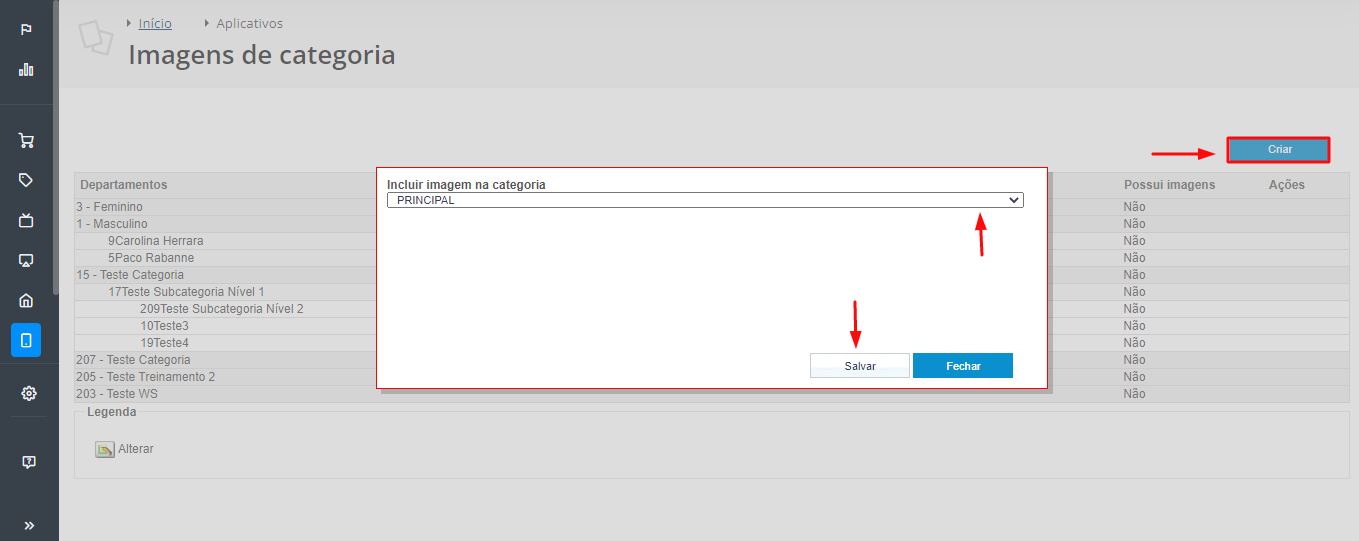
1\) Primeiramente acesse o aplicativo Imagens na Categoria e Subcategorias. Saiba mais sobre o recurso e o sobre como instalar em seu painel administratico clicando [aqui](https://basedeconhecimento.tray.com.br/hc/pt-br/articles/6735562794907-Imagens-na-Categoria-e-Subcategoria).

2\) Ao lado direito da tela aberta clique em **"Criar"**

3\) Em seguida, localize na lista a categoria ou subcategoria para o qual deseja adicionar a imagem, e em seguida selecione o arquivo na proporção recomendada para o tema (200 x 200 pixels);

4\) Agora, clique em “**Salvar**” e pronto! Basta aguardar o tempo para as alterações refletirem em sua loja.

<figure><img src="/files/dMqNTcOaDcy5YWmJQ2GF" alt=""><figcaption></figcaption></figure>

Para exibir imagens no dropdown do menu de categorias (submenu) vincule as imagens para as categorias de segundo nível considerando a proporção **200x250 pixels**. Exemplo:&#x20;

<figure><img src="/files/33e6ka5ve8j3ovV2Xb7H" alt=""><figcaption></figcaption></figure>


---

# Agent Instructions
This documentation is published with GitBook. GitBook is the documentation platform designed so that both humans and AI agents can read, navigate, and reason over technical content effectively. Learn more at gitbook.com.

## Querying This Documentation
If you need additional information that is not directly available in this page, you can query the documentation dynamically by asking a question.

Perform an HTTP GET request on the current page URL with the `ask` query parameter, and the optional `goal` query parameter:

```
GET https://manuais.starads.com.br/colecao-starlight/banners-e-imagens/segmentacao.md?ask=<question>&goal=<endgoal>
```

`ask` is the immediate question: it should be specific, self-contained, and written in natural language.
`goal` is optional and describes the broader end goal you are ultimately trying to accomplish on behalf of the user. GitBook uses it to tailor the answer towards what is most useful for that goal.

The response will contain a direct answer to the question and relevant excerpts and sources from the documentation.

Use this mechanism when the answer is not explicitly present in the current page, you need clarification or additional context, or you want to retrieve related documentation sections.